- DATE:
- AUTHOR:
- The SpotOn Express team

Product Updates: Weeks 06/01/26 - 06/26/26
We've packed this month with updates that cut the tedious stuff out of your day — from automated tip calculations and self-serve refunds to smarter payment reporting and faster ordering flows. Whether you're running the front of house or managing the books, you've got new tools to move faster and see your business more clearly.
Check out all 14 release updates you should know about this month!
Dashboard & Point-of-Sale
Weekly Tip Pooling is Here
Ditch the spreadsheets and automate your tip math. Your POS now supports weekly tip pooling calculations based on hours worked, matching how you actually run your business.
Automate weekly calculations: Eliminate manual spreadsheet tracking and manual errors at the end of pay periods.
Save administrative time: Hand off tedious, late-night math to our automated system.
Align with your operations: Move past rigid daily limits and pick the exact cadence your shift distribution demands.
Smarter automation. Fewer errors. Hours saved.
Log in to Dashboard to configure your weekly tips
Control de Asistencia en Español - Spanish Language Timeclock
We’ve added a Spanish language toggle to your timeclock to support your team and eliminate punch errors. Employees can now switch the display to Spanish instantly in the upper right corner after entering their PIN.
Cut down on punch errors: Clearer communication removes the language barriers that cause clock-in mistakes.
Save manager time: Reduce the friction that leads to manual shift corrections and manager frustration.
Personalized profiles: The system remembers each employee's language preference across sessions without impacting others.
Fewer clock-in mistakes. Less admin friction.
Read more about this setting here
Faster Customizations with Modifier Options
Speed up your ordering process and eliminate kitchen mistakes. With new NO, LIGHT, and ON THE SIDE modifier options, both your staff and guests can quickly apply custom preparation instructions across all your ordering channels.
Simplify order entry: Staff can apply options to modifiers on the POS with just a couple of taps, skipping the need for a bloated modifier group setup.
Keep the kitchen consistent: Streamline communication with guest customizations that format cleanly and uniformly on printed chits and KDS screens.
Empower guests online: Let customers apply these options themselves across SpotOn Order, kiosks, and third-party online channels.
Faster ticket times, fewer order mistakes, and a smoother customization experience for your team and guests alike.
Check out our guide to see how it works
Introducing Guest Count: Track Insights & Spend Per Guest
Unlocking a smarter view of your restaurant's performance just got easier. You can now track guest counts per check right from your POS, giving you clear visibility into critical business metrics, such as average spend per guest.
Track guest flow effortlessly: Add or update guest counts at any point during service using the new chip right inside the cart.
Ensure consistent reporting: Turn on "Force Guest Count" in table maps to automatically prompt servers whenever a table opens.
View instant insights: See your daily guest totals and average spend per guest directly on your POS End of Day screen and Dashboard reports.
Better data, cleaner performance tracking, and actionable insights to help you grow your revenue.
Learn more about guest count here
Speed Up Service with Skip Modifier Settings
Shave valuable seconds off every order during busy rushes. This new item-level setting allows the modifier screen to be skipped automatically on your POS devices whenever selection requirements are already met, getting your staff through the checkout flow faster.
Eliminate extra taps: Skip the modifier screen entirely for standard items that don't require changes, saving staff time on every ticket.
Keep modifiers easily editable: Need to make a change? Simply tap the item in the cart and hit Edit to adjust modifiers whenever a guest requests it.
Enforce selection rules safely: If a default modifier is out of stock or 86'ed, the POS will automatically bring up the screen so your staff never misses a required choice.
Faster order entry, shorter lines, and more time for your front-of-house staff to focus on guest hospitality.
Check out how to accelerate your ordering workflow
Refund Orders Directly from the Dashboard
Simplify your back-office management without the hassle of a support request. You can now process full order refunds directly from the Order List in your SpotOn Dashboard, putting immediate control back into your hands.
Self-serve full refunds: Issue a full refund instantly without needing to contact support.
Find transactions fast: Search and sort orders easily by Order ID, the last 4 digits of the credit card, or order date.
Keep guests informed: Process refunds seamlessly, with funds returning to your guest's credit card within 7–10 business days.
Faster resolution times, less administrative friction, and a smoother back-of-house workflow for your business.
Check out how it works
Apply Tax Rates to Custom Fees
Ensure total compliance and protect your margins without the manual calculations. You can now apply sales tax directly to your Custom Fees from the dashboard, making it easy to meet local tax regulations (such as California’s requirements for specific fee types).
Automate fee taxation: Seamlessly link exclusive tax rates to your order-type charges, like delivery or to-go packaging fees.
Keep receipts clear: Taxes are calculated automatically at checkout and neatly included in the tax line item for your guests.
Streamline your operations: Eliminate manual workarounds for online ordering, OLO, and GoTo channels.
Effortless legal compliance, accurate tax collection, and more peace of mind during checkout.
Learn how to set up your tax fees
Simplified Tax Reconciliations
Tax season and regular accounting just got a whole lot smoother. Our new Tax Summary Report gives you and your accountant a single, complete view of your tax liability across your POS and marketplace channels without the manual digging.
With this update, you can:
Track expectations vs. reality: View Calculated Tax, Collected Tax, and the exact difference at a glance.
Export in seconds: Filter by individual tax rates and export everything directly to Excel for your accountant.
Stop wasting hours auditing individual orders.
Log in to your SpotOn Dashboard reporting section to view your Tax Summary Report
Take Control with the the Payment List Report
Say goodbye to reconciliation friction. You now have direct, self-serve access to raw payment data right from the Dashboard—no support calls required.
This powerful update brings multi-location visibility and robust filtering to help you audit and track financials with ease.
With this new capability, you can:
Customize your view: Choose from 50+ configurable data columns to see exactly what matters to your business.
Filter with precision: Utilize advanced text search and multi-location filters to pinpoint specific transactions.
Export instantly: Pull comprehensive CSV reports for fast, seamless accounting.
Get deep visibility and total autonomy over your data.
Log in to your Dashboard today to explore the new Payment List report.
Credit Card Surcharging: Protect Your Margins Legally
Offset rising credit card processing fees without forcing a menu price increase. Credit Card Surcharging provides a transparent, legal way to apply a surcharge to credit card transactions in full alignment with local regulatory requirements.
Protect your bottom line: Automatically add a credit card surcharge to transactions to safeguard your thin restaurant margins.
Minimize compliance risk: Reduce the risk of fines and legal complications with configuration guardrails built directly into your dashboard.
Maintain transparency: Provide clean, compliant line-item visibility for your guests during checkout.
Note: Surcharging is prohibited in CT, ME, and MA, capped at 2% in CO and OK, and requires the rates team approval.
Check out our Surcharging Guide to learn more
Add-On's
Teamwork: Shifts & Pay at a Glance
The Teamwork Classic App’s redesigned homepage and navigation put essential daily data front and center, saving time for your staff and reducing headache calls for you.
Now, your team can:
See upcoming shifts instantly right upon login to stay on schedule.
View a weekly pay summary covering take-home tips and hours worked without extra clicks.
Navigate tools faster using a cleaner, decluttered side menu.
Faster insights. Smoother operations.
Note: Please ensure your team downloads the latest version of the Teamwork app to enable this update.
Download Teamwork Classic:
iOS: link to download
Android: link to download
Same-Day Scheduled Orders: Prep With Precision
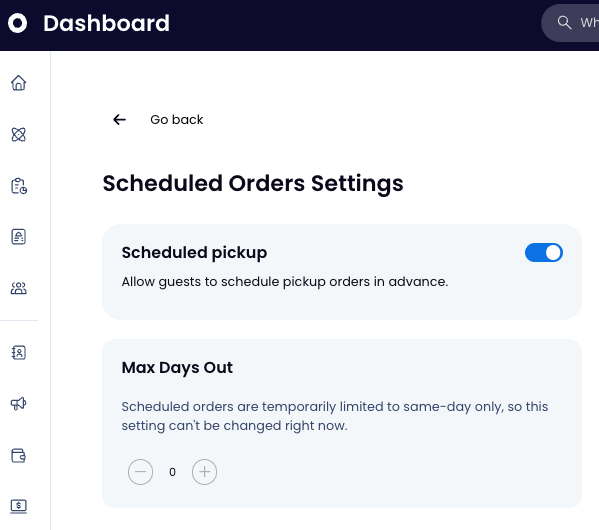
Let guests plan ahead while keeping your kitchen in sync. Customers can now schedule same-day pickup times via SpotOn Order or the GoTo Place mobile app.
Automate workflows: Orders are held and sent to the kitchen automatically based on your lead times. No manual tracking needed.
Boost convenience: Let guests secure their orders early, perfect for busy lunch rushes or dinner plans.
Control the pace: Keep your line moving smoothly by printing tickets exactly when prep should start.
Smoother kitchen flow and perfectly timed handoffs.
Enable in Dashboard > Online Ordering > Scheduled Orders.
SpotOn Order: One-Tap Reordering
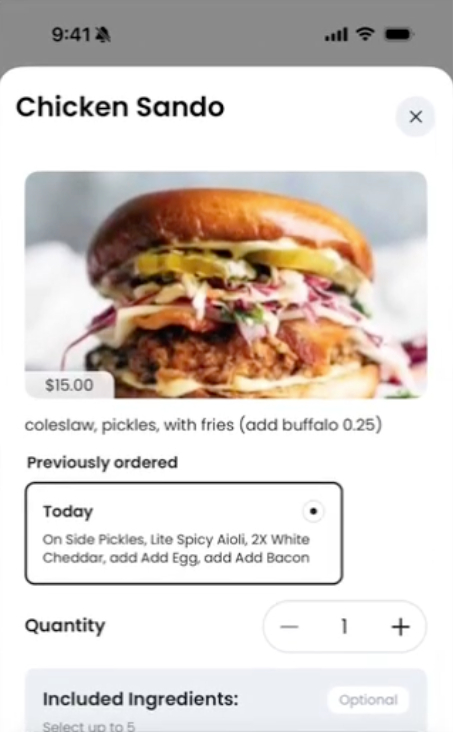
Give regulars a faster way to checkout. When guests revisit a favorite item on SpotOn Order or the GoTo app, their past customizations now surface automatically.
Speed up checkout: Guests can add their exact past order to their bag with a single tap—skipping the modifier menus.
Personalize the experience: Make guests feel like regulars by remembering exactly how they like their food.
Drive repeat business: Less friction means faster reordering and higher conversion rates.
A tailored ordering experience that keeps your regulars coming back.
GoTo App: Send Guests Straight to Your Menu - RPOS & Express
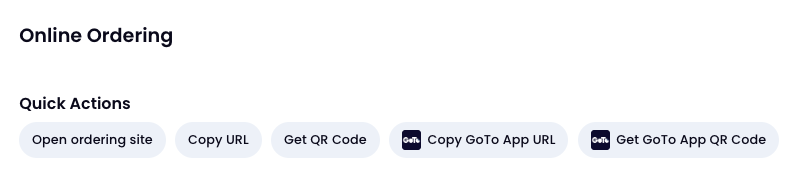
Make it easier than ever for guests to order from you. You can now generate custom links and QR codes that drop guests directly onto your menu in the GoTo app.
Skip the search: Guests are routed straight to your storefront after downloading—no typing or scrolling required.
Market anywhere: Use your custom URL on social media and your website, or print the QR code for table tents.
Drive repeat business: Remove the friction, bypass the competition, and make mobile ordering effortless.
A seamless path from your marketing directly to their checkout.