- DATE:
- AUTHOR:
- The SpotOn Express team

Product Updates: Weeks 09/01/26 - 09/30/26
This month is all about giving you more control over every shift! Real-time 86ing, one-click online ordering pauses, and cleaner kitchen chits keep your team calm during the rush, while combo upsells, auto gratuity, and fee-free tip access with the SpotOn Card help you grow revenue and take care of your staff. Check out all 13 release updates you should know about this month!
Dashboard & Point-of-Sale
Sales Summary: Compare Performance Over Time
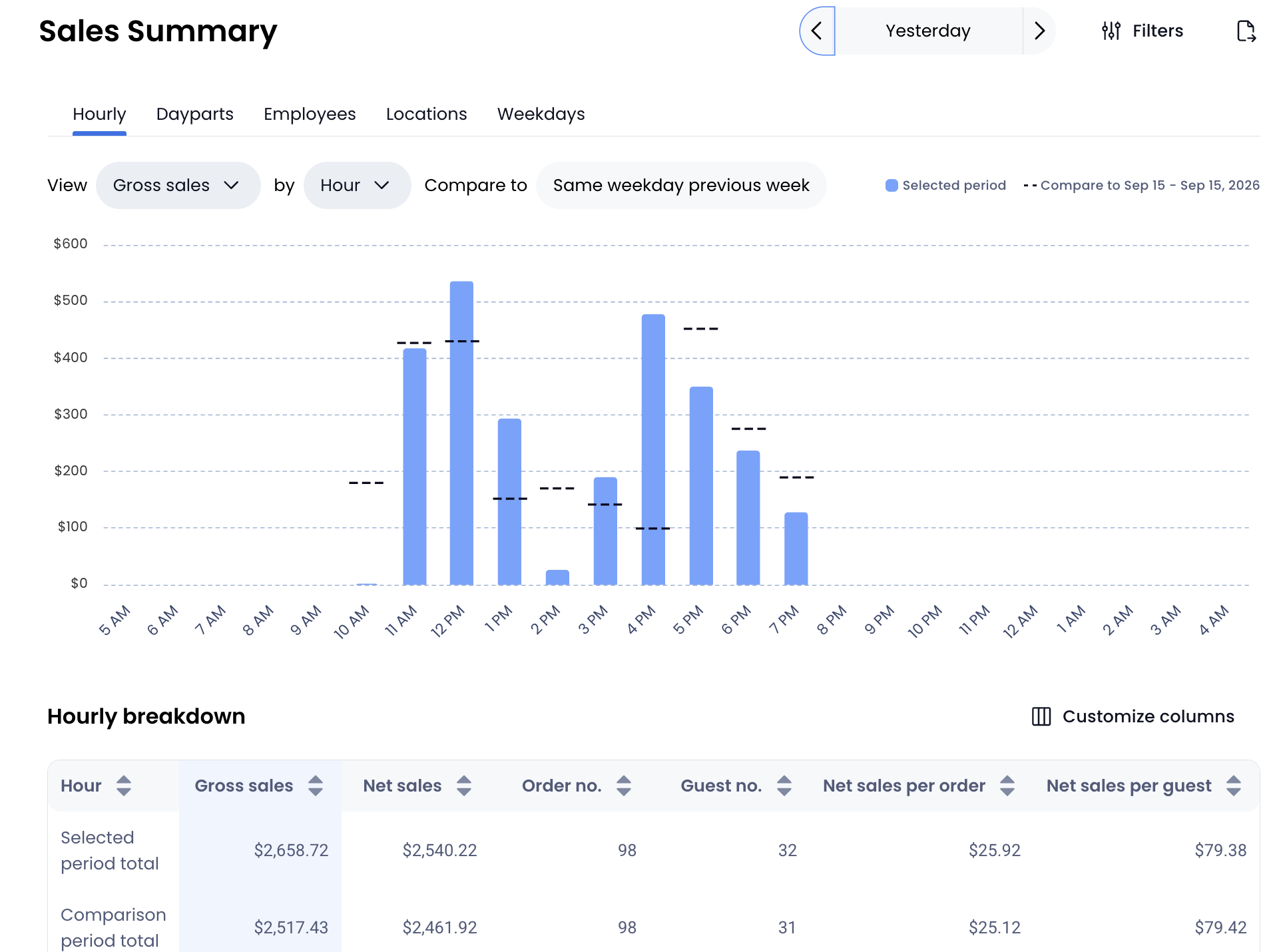
Spot trends and make smarter operational decisions with customizable comparison periods on your Sales Summary report. You can now chart and compare performance like gross sales or guest number by hour and/or weekday against prior performance to see exactly how your business is pacing.
Flexible date ranges: Compare performance against the previous week, week before last, the same period last year, or custom date ranges.
Hourly & daily breakdowns: Chart performance by hour and/or weekday to identify peak business hours and spot revenue trends.
Use Sales Summary comparison periods to track performance against past trends and optimize daily operations.
Review your Sales Summary in SpotOn Dashboard
Reporting: POS Audit Log
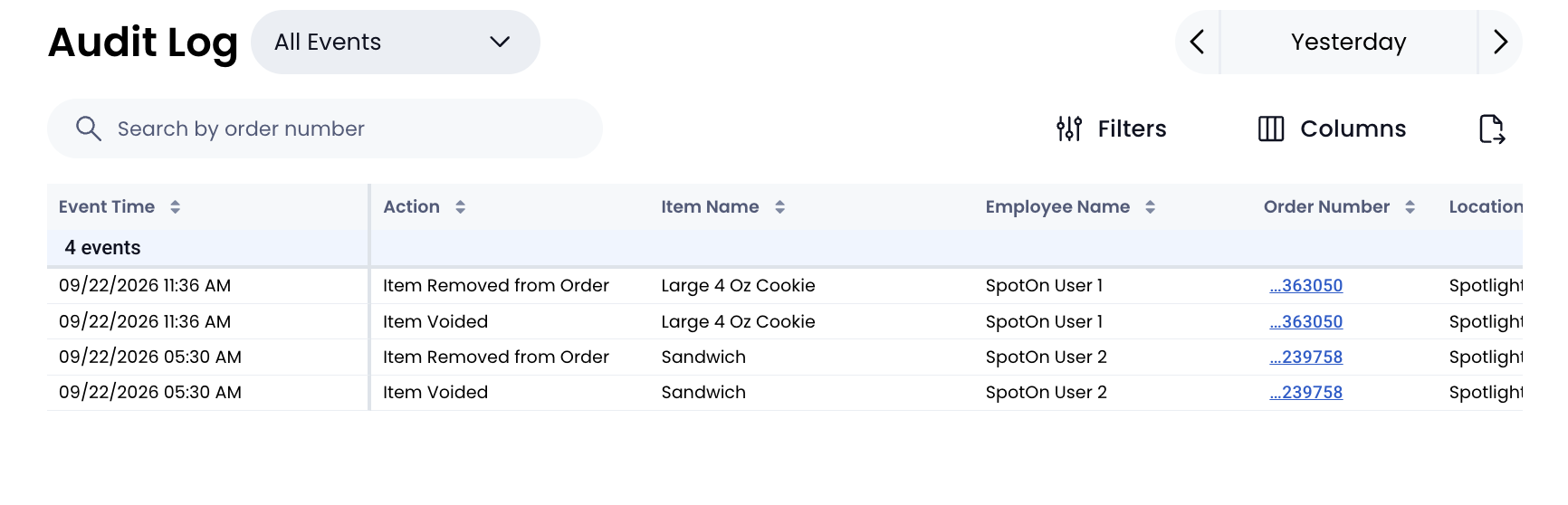
Gain full visibility into POS activities and stay connected to daily operations, even when you're off-site. The new Audit Log view under Reports > Accounting gives managers a clear, detailed look at employee actions across your point of sale.
Spot potential issues: Filter activities by event type or employee to quickly track POS events.
Customize & drill down: Tailor report columns and click into specific order details for complete context.
Export with ease: Download audit reports directly to support management reviews and keep clean records.
Use the POS Audit Log to track employee activity, spot high-risk events, and maintain full visibility over your point of sale.
Review your POS Audit Log in SpotOn Dashboard
Access the exact data you need without rebuilding filters every time you log in. Dashboard Reports now features pre-built saved views and customizable list views across standard reporting lists like orders, discounts, and payments.
Pre-built views: Instantly toggle pre-configured filters to isolate refunded orders, voided items, or specific payment methods.
Customized reporting: Adjust filters and tailor columns to build personalized views, then save them for one-click access anytime.
Use saved and customized list views to tailor your reporting data and quickly access the operational insights that matter most.
Save a custom view in your reports
Tailor your daily reporting to focus on the numbers that matter most to your business. You can now fully customize your Dashboard Daily Recap to highlight key operational data at a glance.
Show what matters: Toggle individual metrics on or off to focus on your most critical KPIs.
Reorganize with ease: Use simple drag-and-drop controls to reorder sections and build your ideal report layout.
Use the customizable Daily Recap to prioritize key metrics and get a tailored snapshot of your daily performance.
Customize Daily Recap Report in SpotOn Dashboard
SpotOn Dashboard: All Your Reviews & Feedback in One Place
Manage your online reputation without juggling multiple platforms. The new SpotOn Reviews page brings Google, Yelp, and direct guest feedback into a single, unified view.
Centralize feedback: Track public reviews alongside feedback from SpotOn Order and the GoTo Place app.
Tie feedback to orders: Trace guest comments directly to specific orders to spot trends, resolve issues fast, and better understand your guests.
Instant setup: In your Dashboard, click Customers > Reviews and then tap Connect to start tracking for free.
Online Ordering: One-Click Pause to Control the Rush
When your kitchen is underwater, you need to stop the flow immediately. You can now pause and resume SpotOn Order, DoorDash, and Uber Eats with a single click on the POS or in Dashboard.
Stop the overwhelm: Halt incoming orders instantly without digging through multiple menus.
Control from anywhere: Manage your channels directly from your Dashboard home or the POS.
Stay perfectly synced: Pausing automatically updates your status across your POS, Dashboard, and delivery apps.
AI Menu Assistant: Bulk Edit Your Menu in Seconds
Managing your menu shouldn't feel like a tedious click-by-click chore. With AI Menu Assistant and our new bulk editing view, you can update multiple items at once from a single, intuitive table—saving hours of back-office work.
Edit in bulk: Update names, prices, categories, descriptions, and modifier groups directly in one table without opening items individually.
Preview AI changes: Easily review AI Menu Assistant updates highlighted in context before saving.
Switch views effortlessly: Toggle seamlessly between the new list view and your familiar grid view anytime.
Faster menu updates. Effortless accuracy. More time back to run your restaurant.
Learn how to start editing today!
Real-time 86ing: Instant Menu Updates Across All Devices
Keep your floor and kitchen in sync without missing a beat. When an item or modifier is marked unavailable, changes now apply across every device instantly—no waiting or manual refreshes required.
Prevent order mistakes: Instantly block 86ed items and modifiers on all POS terminals the moment you run out.
Eliminate shift lag: Skip manual menu refreshes and 5-minute wait times across handhelds and stations.
Keep BOH & FOH aligned: Ensure servers sell only what's in stock for a smoother guest experience.
Faster updates. Cleaner orders. Zero confusion.
Read the 86ing Guide to learn more!
Combo Upsells & Add-Ons: Drive Incremental Revenue
Turn every combo order into a higher-ticket sale. With new subitem pricing and optional add-on choices, you can seamlessly offer premium upgrades and extra options right within your standard combos.
Drive higher ticket sizes: Charge extra for premium upgrades, like swapping regular fries for onion rings.
Offer optional extras: Allow guests to add optional drinks or extra sides with custom max limits.
Save setup time: Reuse combo option groups and create items with fewer clicks in your dashboard.
Higher margins. Faster combo setup. More revenue on every ticket.
Set Auto Gratuity
Automatically apply a set gratuity percentage to large-party checks. Managers configure the percentage, guest count threshold, and calculation basis once in Dashboard, and Express applies it on every POS device, every shift.
Learn How to Set Auto Gratuity
Add-On's
The SpotOn Card is Here: Fast, FREE Tip Access!
Rapid tip access just got a major upgrade! DayCheck employees can now receive approved tips instantly with zero transfer fees on the all-new SpotOn Card, plus enjoy a sleek, redesigned app.
Rapid & Fee-Free: Tips land on the SpotOn Card right after approval with zero transfer fees.
Additional Benefits: 40,000+ fee-free ATMs, Apple/Google Wallet support, and FDIC insurance.
Using DayCheck? Inform your employees they can apply in-app from the "Accounts" tab.
New to DayCheck? Check out DayCheck in Dashboard to unlock rapid tip payouts.

Track your gift card performance effortlessly with the new native Gift Card report, powered by eCard Systems. Access real-time insights on sales, redemptions, and liability directly from your SpotOn Dashboard at no additional cost.
Track sales & liability: Monitor gift card balances, redemptions, and year-over-year growth in one view.
Zero setup required: Automatically available in Dashboard under Reports > Gift Cards for eCard Systems gift card users.
Optimize marketing: Use spending trends to plan smarter holiday and promotional campaigns.
Express: Faster Prep with Cleaner Kitchen Chits
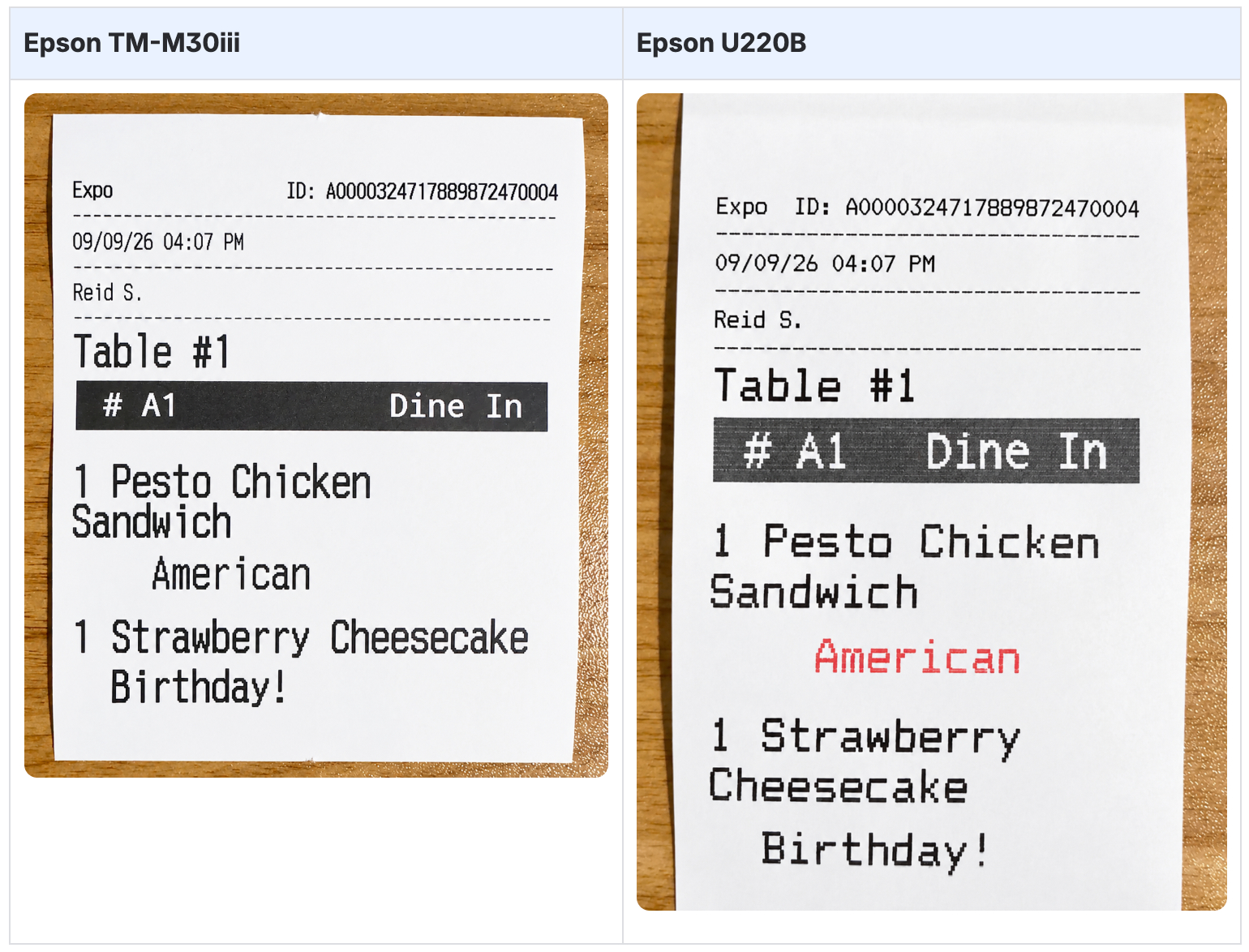
Kitchen tickets just got a major readability upgrade. Printed chits now feature a streamlined, clutter-free layout that helps your kitchen staff read orders faster at a glance.
Speed up ticket reading: A smaller header and removed divider lines give kitchen staff instant focus on what matters—the food.
Reduce kitchen mistakes: Cleaner layout formatting ensures line cooks prepare orders quickly and accurately.
Save on paper costs: Compact ticket design reduces unnecessary paper waste over busy shifts.
Faster prep. Fewer errors. Zero setup required.
Check out our Printed Kitchen Chits Guide!